Groovepad - Music Maker
- 4.6
- Rating
- 100.00M
- Installs
- Free
- Price

 Analysis by App-foxy
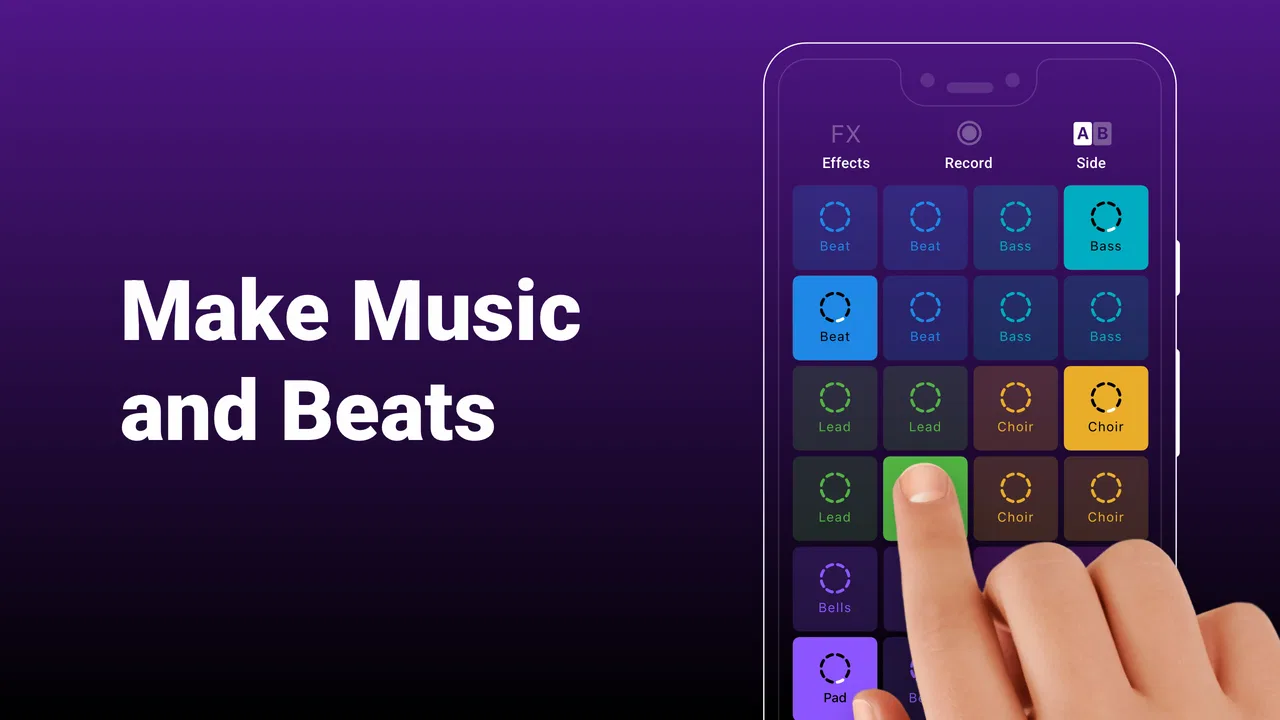
Groovepad - Music Maker is the kind of music and audio app I open when I want to play with sound without turning the moment into a technical project. It is made by Easybrain, and the basic idea is approachable: choose a style, tap pads, layer loops, and shape a beat through live interaction. I would not put it in the same category as a full digital audio workstation, but that is also why it works so well for quick experiments.
My first impression was that the app is designed around immediacy rather than precision. You can get something musical happening quickly, which makes it friendly for beginners, children, casual listeners, and anyone who wants a creative break. At the same time, the simple surface hides a few decisions that matter once you use it regularly, especially when your connection is unreliable, your mobile data is limited, or you expect to save and edit music like a producer.
A quick way into beat-making
The central interaction is easy to understand. Instead of beginning with an empty timeline, I start from a collection of sounds and activate them as the track develops. That removes one of the biggest barriers in beat-making: not knowing what to place first. The result feels closer to playing an instrument than filling in a spreadsheet, and the immediate response encourages experimentation.
You May Also Like

 AccuWeather: Weather Radar
AccuWeather Review: A Quick, Clear Forecast for Everyday Decisions
For everyday plans, the best forecast is the one you can understand quickly. AccuWeather makes rain timing, radar, and local conditions easy to act on, with a few trade-offs.

 Hill Climb Racing
Why Hill Climb Racing Still Turns Crashes Into One More Run
A tiny car, a bumpy hill and one more upgrade: Hill Climb Racing keeps resurfacing because its simple chaos makes every near-miss feel personal.

 AliExpress - Shopping App
AliExpress Makes Global Shopping Feel Personal, but Shoppers Bear the Risk
AliExpress turns a global marketplace into a pocket-sized discovery engine. Its reach is useful, its shopping loop compelling, and its trade-offs easy to miss.

 Lords Mobile: Kingdom Wars
Lords Mobile Is a Kingdom-Building Routine, Not a Quick Match
A case-by-case verdict on the building, battles, device demands, and social commitments that make Lords Mobile rewarding for some players and exhausting for others.

 PDF Scanner app - TapScanner
TapScanner Makes Paperwork Easier to Capture, Check, and Share
TapScanner makes scanning with a phone feel less like a rescue operation and more like a dependable step in getting work done. Its capture tools are useful, though not flawless.

 Block Blast!
 Shows How Much a Puzzle Game Can Leave Out
A quiet grid game shows why puzzle players increasingly value instant clarity, repeatable skill and low-pressure play—and where the genre still needs to catch up.
More From Our News Desk
View All News


I found this approach particularly useful when I had only a few minutes. On a commute, during a break, or while waiting for an appointment, I could explore a rhythm without needing headphones, a keyboard, or previous music theory knowledge. The app turns small gestures into a musical conversation, so even a short session can feel complete rather than like unfinished setup work.
The trade-off is that the guided structure also limits how far I can take an arrangement. If I want exact note placement, detailed automation, advanced mixing, or a traditional multitrack workflow, this is not the right tool. A dedicated mobile workstation is better for that kind of control. Groovepad is strongest when the goal is to discover a groove quickly, not to reproduce every detail of a studio process.
What connectivity changes during normal use
The network matters most around the parts of the experience that depend on loading or updating content. When I have a stable connection, moving through the app feels more convenient because available material can be reached without much thought. When the connection is weak, the enjoyable tapping itself is not the only thing I have to consider; I also have to allow for content that may take longer to appear or may not be ready when I want it.
That distinction is important. I would not treat this as a guaranteed no-connection music box. The safest habit is to open it before leaving a reliable network, explore the material I expect to use, and avoid assuming that every sound or section will always be immediately available in a low-signal situation. This is especially relevant on trains, in underground areas, at crowded events, or anywhere a phone keeps switching between weak mobile signals.
For a casual session at home, connectivity is rarely a deciding issue. The app feels more natural when I can browse without worrying about delays. For a planned trip, however, I would test the exact workflow beforehand rather than discovering limitations after the network disappears. That small check can prevent the common frustration of opening an app for a creative distraction and finding that the part I wanted has not loaded.
Another practical point is patience. If a sound does not respond immediately, repeatedly tapping can make it harder to tell whether the problem is the connection, the interface, or my own timing. I get better results by waiting briefly, checking whether the rest of the screen is responding, and then trying again. This sounds minor, but it keeps a temporary network delay from turning into a messy performance.
Using it in real mobile situations
Groovepad suits short, informal sessions better than long production work on a small screen. I can use one hand for simple interactions, although a larger display makes the layout easier to read and gives my fingers more room when several pads are involved. In a noisy environment, headphones help me judge the blend more clearly, while a quiet room makes it easier to notice whether a layer is overpowering the rest.
A realistic example is a lunch break. I might open the app, choose a style that matches my mood, build a short pattern, and spend five or ten minutes changing the combination of sounds. I am not trying to finish a commercial track; I am using the app as a low-pressure creative reset. That is where it feels more rewarding than a complex alternative, because I do not spend the whole break configuring a project.
It also works for introducing someone else to rhythm. I can hand the phone to a friend or younger family member and explain the basic interaction quickly. The visual feedback makes cause and effect clear: tap something, hear a change, remove it, hear the space return. The Everyone content rating makes it suitable for a broad audience, though I would still supervise younger users around purchases and device settings.
On the other hand, I would skip it for serious live performance unless I had already tested the exact device, headphones, and connection conditions. Touchscreens can be expressive, but they do not offer the same physical confidence as dedicated pads or keys. A musician who needs repeatable timing, external equipment, or deep control will likely feel constrained.
Recovering when a session goes wrong
One advantage of a loop-based interface is that mistakes are usually easy to hear and correct. If I activate a layer that clashes with the rhythm, I can remove it and listen again instead of repairing a long recording. That makes experimentation less intimidating and gives beginners permission to try combinations that might not work.
Still, a mobile session can fail in ordinary ways. An incoming call, an accidental screen touch, a slow connection, or an app interruption can break concentration. My practical advice is to treat short ideas as disposable until I know exactly how the app handles saving or sharing in my own setup. I avoid building a complicated arrangement in the first few minutes; I first confirm that the sounds I want are available and that the session behaves normally.
If the app becomes unresponsive, I would not immediately assume the project is lost. I first stop tapping, wait for the interface to catch up, and check whether the phone itself is busy. Reopening the app is a reasonable next step, but I would only rely on recovery behavior after testing it with an unimportant experiment. That is a general mobile habit, yet it matters here because the appeal of the app encourages spontaneous sessions where users may not think about preserving work.
The simple design helps recovery because there are fewer controls to untangle. I can usually return to the musical idea rather than searching through menus. The weakness is the other side of that simplicity: people who want detailed project management, dependable versioning, or careful editing may miss the safeguards found in more advanced software.
Keeping mobile data under control
Because Groovepad can involve browsing and loading musical material, I would use Wi-Fi for exploration when possible. That is not only about speed. It also makes it easier to try several styles without wondering how much mobile data each discovery is consuming. If I am on a limited plan, I would avoid casually opening every available option while away from home and would prepare the session in advance.
My preferred routine is simple: while connected to Wi-Fi, I explore a few styles, decide which ones suit the session, and then use the app more selectively outside. I also keep an eye on the phone’s own data controls rather than assuming the app will manage usage exactly as I expect. This is especially sensible when traveling, where background activity and roaming charges can create unpleasant surprises.
The free price makes trying the app easy, but free access should not be confused with unlimited access to every possible element. In-app purchases range from $6.99 to $46.99 per item, so I would review the purchase screen carefully before confirming anything. On a shared device, purchase authentication is worth enabling, particularly when children are likely to explore the app.
This is one area where the app’s casual personality can be misleading. The tapping feels like a quick game, but the financial decision is still a real app-store purchase. I recommend treating optional content as a deliberate choice: decide whether it adds enough value to your personal use before paying, rather than buying simply because a new sound appears at the right moment.
How it compares with familiar alternatives
Compared with a conventional music player, Groovepad is far more interactive. A player gives me finished tracks; this lets me influence the arrangement and hear an immediate result. Compared with a full music-production app, it is much easier to begin but much less suitable for detailed composition. The useful middle ground is its main identity: it offers more participation than listening and less complexity than production software.
That makes the choice depend on the job. If I want a quick beat idea, a playful rhythm exercise, or an accessible introduction to loops, I would choose this over a workstation. If I need to record vocals, edit individual notes, balance a mix carefully, or return to a project with studio-like precision, I would choose a more advanced alternative even if it takes longer to learn.
There is also a difference in creative mindset. Groovepad encourages happy accidents because the starting material gives me a direction. A blank project in another app may offer more freedom, but it can also create decision fatigue. I sometimes prefer the guided limitation because it helps me make something instead of endlessly choosing instruments and settings.
Who will get the most from it
I think the best audience is someone curious about beats but unwilling to study a complicated interface first. It is also a good fit for casual creators who want a pocket-sized musical toy with enough structure to produce satisfying results. Teachers or parents looking for an approachable rhythm activity may find the immediate feedback useful, provided they handle purchases responsibly.
The app is less convincing for experienced producers. The simplicity that welcomes beginners can become a ceiling once you want exact control. It is also not ideal for someone who expects a complete library of finished songs, because the point is to participate in the sound rather than simply press play.
Storage, battery, screen size, and network conditions can all influence how comfortable it feels on a particular phone. I would not judge the whole experience from a single rushed test in a poor-signal location. At the same time, I would not ignore those conditions if mobile use is my main reason for installing it. A creative app needs to fit the way I actually travel and work, not only perform well at home.
What the current app details mean for new users
Groovepad is free to install, aimed at Everyone, and available on devices running Android 7.0 or later. Its current version is 1.27.0, which is useful to check when troubleshooting because behavior can change as an app is updated. I would keep the app and operating system reasonably current, while still testing important workflows after a major update.
Its scale is a strong sign that the concept has broad appeal: it has passed 100 million installs, carries a 4.6 average from around 1.7 million ratings, and has about 98 thousand written reviews. Those figures do not replace personal testing, but they do indicate that this is an established app rather than an obscure experiment.
The release date of July 2, 2019 also places it in a mature part of the mobile-app landscape. That can be reassuring for people who prefer a product with a substantial history, although maturity does not guarantee that every device or network behaves identically. I still recommend checking the app on the phone you actually plan to use, especially if you care about uninterrupted sessions.
My connectivity verdict
After using it as a quick music-making tool, I see Groovepad as a strong companion for spontaneous creativity, with connectivity shaping the experience more than a first glance might suggest. A reliable network makes browsing and preparation smoother; a weak or unavailable connection can make a planned session less predictable. I would therefore prepare favorite material on Wi-Fi and avoid promising myself a particular workflow until I have tested it in the places where I intend to use it.
My recommendation is straightforward: install it if you want an easy, playful route into beats and understand that it is not a replacement for a full studio. Use it during short breaks, invite a friend to experiment, and let the guided loop approach remove the pressure of starting from nothing. Be more cautious if you have strict mobile-data limits, need dependable offline access, or expect detailed editing and professional control.
For me, the best part is the low barrier between an idea and a sound. The main limitation is that the same simplicity can leave advanced users wanting more, while network-dependent moments require a little preparation. If those boundaries match what you need, Groovepad - Music Maker is an enjoyable free starting point, and its broad reach is understandable. I would recommend it to a friend as a creative sketchbook for rhythms, not as a complete recording studio.
FAQs for Groovepad - Music Maker
01What features does Groovepad offer for music creation?
Groovepad provides a user-friendly interface with a wide variety of sound packs from genres like hip-hop, EDM, house, and more. Users can create tracks using loops and apply effects such as reverb or delay. The app also includes features like a live loop mode, allowing for seamless music production.
02Is Groovepad suitable for beginners in music production?
Yes, Groovepad is designed with beginners in mind, offering an intuitive layout that makes it easy to start creating music. The app includes a tutorial mode to guide new users through the basics, ensuring that even those with no previous experience can create professional-sounding tracks.
03Can I export and share the music I create on Groovepad?
Absolutely! Groovepad allows users to export their creations in high-quality audio formats. Once exported, tracks can be shared directly from the app to social media platforms or messaging apps, making it easy to showcase your music to friends and followers.
04Does Groovepad require an internet connection to function?
While many features of Groovepad can be used offline, an internet connection is required for downloading new sound packs and updates. Once a sound pack is downloaded, it can be used offline, enabling users to create music anywhere, anytime, without needing continuous internet access.
05Are there any in-app purchases or subscriptions in Groovepad?
Yes, Groovepad offers a free version with basic features, but it also includes in-app purchases for premium sound packs and effects. Users can opt for a subscription to access the full range of features and regularly updated content, ensuring a constantly evolving music-making experience.
Pros
- Intuitive interface for beginners.
- Wide variety of sound packs.
- Responsive touch controls.
- Regular updates with new features.
- Offline mode available.
Cons
- Limited free content.
- Ads can be intrusive at times.
- In-app purchases can add up.
- Requires initial learning curve.
- Limited export options.

Groovepad - Music Maker
Gallery